Even though Enesys RS Data Extension supports a large set of authentication mechanism, SharePoint 2010 and the new Claims Based Authentication mechanism was only partially supported when Reporting Services is configured in SharePoint Integration mode.
With ERSDE 3.7, we have completely revisited the authentication mechanism to provide all possible options whether you are using a SharePoint integrated or Standalone setup.
Before going a bit further, let’s summarize the new features you can expect in this area:
- Kerberos is not necessary anymore when using Windows Integrated Security in SharePoint Integration Mode.
- Support for passing credential of the SharePoint user running the report in a FBA Site when Reporting Services is configured in SharePoint integration mode.
- Support for Claims Based Sites (Forms or Windows authentication) using Windows Integrated Security (Stored Credentials was already supported in version 3.6).
In order to provide support for Claims based sites along with all the authentication features currently available, Enesys RS Data Extension provides two data sources at the server level. The new data source type takes advantage of SharePoint token support in Reporting Services 2008 R2.
The following screen shot shows both data source types available when configuring a data source definition at the server level in SharePoint integration mode. Enesys SharePoint Token Data Extension 2008 is the newer data source available as part of Enesys RS Data Extension 3.7.
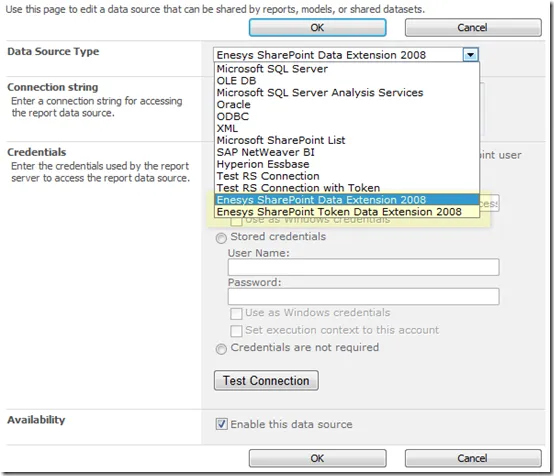
In most cases, you will use the regular data source. However, when using Reporting Services 2008R2 in SharePoint Integration Mode for reports using Integrated Security credentials (said another way: the current SharePoint user running the report), you will use the newer (Token based) data source. You can freely switch from one data source type to the other when needed.
Note that only one type of data source is available within Business Intelligence Development Studio: the obvious reason is that it doesn’t make sense to get the token from the current SharePoint user when previewing a report from a client application – you are not logged in as a SharePoint user.
Things can easily be overwhelming when dealing with the various Reporting Services versions, the various SharePoint authentication schemes and the credentials being used for running reports. To make it easier, the following table summarizes the type of data source you should use depending on your Reporting Services version, the authentication mode of your site (web app) and the approach for authenticating: Stored Credentials or Integrated Security (or the current SharePoint user):
| | Integrated Security / SP User | Stored Credentials | | | -------------------------------- | ------------------------------------- | ------- | | Reporting Services 2005/2008 | | | | SharePoint Integrated Mode | | | | Classic Windows (SP2007/SP2010) | Regular (Kerberos not needed) | Regular | | Classic Forms (SP2007) | Not Supported | Regular | | Claims Windows (SP2010) | Not Supported | Regular | | Claims Forms (SP2010) | Not Supported | Regular | | Standalone Mode | | | | Classic Windows (SP2007/SP2010) | Regular (Kerberos needed) | Regular | | Classic Forms (SP2007) | - | Regular | | Claims Windows (SP2010) | Regular (Kerberos Needed) | Regular | | Claims Forms (SP2010) | - | Regular | | Reporting Services 2008R2 | | | | SharePoint Integrated Mode | | | | Classic Windows (SP2007/SP2010) | Regular/Token (Kerberos not needed) | Regular | | Classic Forms (SP2007) | Token | Regular | | Claims Windows (SP2010) | Token (Kerberos not needed) | Regular | | Claims Forms (SP2010) | Token | Regular | | Standalone Mode | | | | Classic Windows (SP2007/SP2010) | Regular (Kerberos needed) | Regular | | Classic Forms (SP2007) | - | Regular | | Claims Windows (SP2010) | Regular (Kerberos needed) | Regular | | Claims Forms (SP2010) | - | Regular |
Notes:
- With Enesys RS Data Extension 3.7, Kerberos is not needed anymore when running reports using Integrated Security with Reporting Services configured in SharePoint Integration mode (as long as you are not disabling object model). Note that it is still necessary with Reporting Services configured in Standalone mode for passing Windows Integrated Credentials in a multi-server environment: this is not a limitation of Enesys RS Data Extension but the way it works in Windows environment.
- The new data source type (Token) is only being used for accessing Claims Based Sites (and also Classic 2007 FBA sites) in SharePoint Integration mode. Reporting Services 2008 R2 is required in that case.
- ”-” (dash sign), means it’s not supported because it doesn’t make sense. In standalone mode, a report is hosted by Reporting Services report manager and run through its own web interface whereas in SharePoint integration mode, a report is necessarily run by a SharePoint user.
- Not Supported, means that even though that would make sense to implement this approach, Reporting Services 2005/2008 limitations make it impossible to implement.