Query Construction
Enesys SharePoint Query language syntax is based on XML. The syntax is simple and straightforward. However, we are providing a Visual Query Designer that makes it unnecessary to deal with the details of the syntax.
Enesys SharePoint queries
Section titled “Enesys SharePoint queries”A query is composed of several statements. The following Query Designer screenshot shows a query using 3 statements:
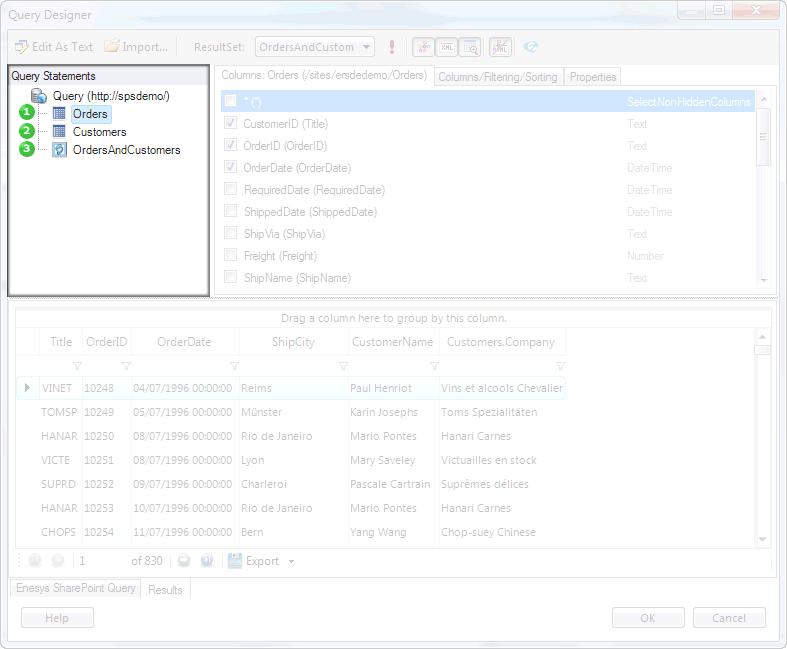
Each statement executes a specific function depending on its type. For instance, the List statement will retrieve data from a specific SharePoint list. The RollUpLists statement will retrieves items in an entire site collection. The SqlQuery statement makes it possible to manipulate the resulting data from other statements using SQL SELECT syntax.
Statements are executed sequentially starting from the first statement. The resulting data from each statement is stored in a temporary table so that it can be further manipulated by a SqlQuery statement. Therefore, in order to join two SharePoint lists, you will need to add a List statement for each list and a SqlQuery statement that will let join both lists using SQL SELECT syntax.
In the Visual Query Designer, you can add a statement by clicking on the “New” menu item inside the Query Statements panel as shown in the following screen shot:
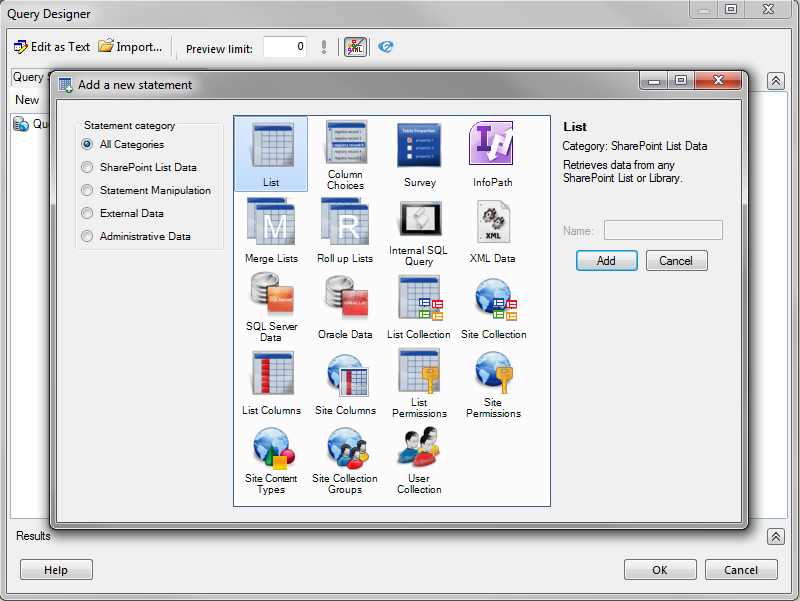
Of course, each statement has its own options and properties available through query designer interface. For instance, for a list statement, you may specify the desired columns or you may decide to filter on a specific folder. You can find more information about the options inside the chapter “ ” page “ ”.
| STATEMENT | DESCRIPTION |
| list | Retrieves data from a SharePoint list. |
| columnChoices | Retrieves the choices available for a specific list column or site column of type Choice (or derivated). |
| survey | Retrieves data from a SharePoint Survey list in a format that makes it possible to build reports (as opposed to the raw data that is normally returned by a survey list). |
| infoPath | Retrieves data from an InfoPath form for both promoted and non-promoted fields. |
| listsMerge | Merges multiple SharePoint lists at once, based on the data of other statements. |
| rollUpLists | Retrieves items from lists in an entire site collection. |
| sqlQuery | Uses SQL Select syntax to merge, join and aggregate the data resulting from any other statement. |
| xmlQuery | Retrieves XML data from any URL. |
| sqlData | Used to retrieve data from any SQL Server or Oracle databases. |
| Administrative statements | Various administrative statements that let you retrieve back end information about SharePoint. |
As you can see, the sqlQuery statement is extremely important in the sense that it will let you apply sophisticated manipulations on SharePoint data from multiple lists and sites. Except for simple needs (or when you just need to roll up list items in an entire site collection using rollUpLists statement) , your query will often be composed of multiple statements with at least a sqlQuery statement that will let you join/merge/aggregate the data resulting from other statements.
The following screenshot shows the sqlQuery statement that is used to join both Orders and Customers SharePoint lists:
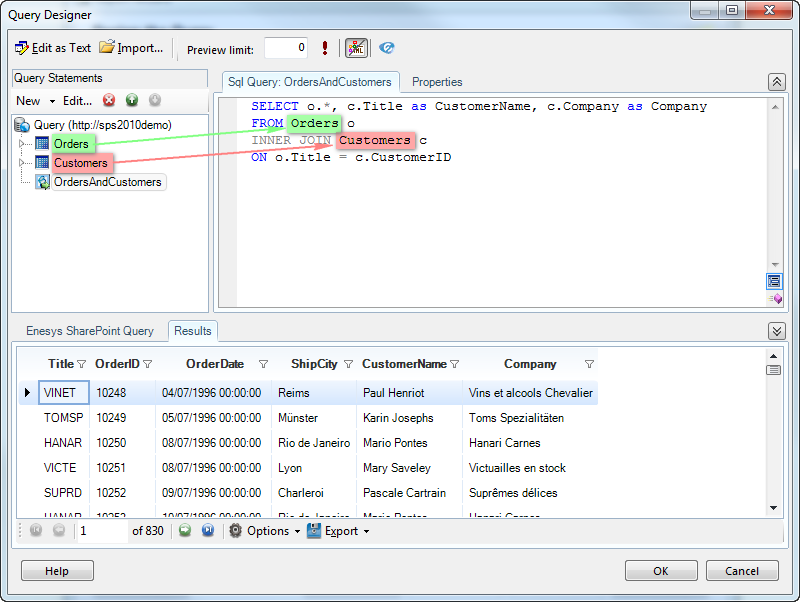
Note that you can use “Orders” and “Customers” as if they were simple tables.
Conclusion
Section titled “Conclusion”The approach we have taken with Enesys SharePoint Query makes it possible to come up with sophisticated queries. You are not limited to a single sqlQuery statement per query. You can join the result of a sqlQuery statement with the data resulting from any other statement by using another sqlQuery statement. This specific approach will let you solve most of business needs you are facing regarding SharePoint data stored in multiple lists and sites.