Using the Object Model for rolling up data
Starting from the version 3.5, Enesys RS Data Extension lets you use the SharePoint Object Model if it is available during the query execution. The Object Model allows some optimizations to take place. In some scenarios, the performance improvement can be substantial.
Enabling the Object Model
Section titled “Enabling the Object Model”The Object Model is enabled by default and will be used if the necessary requirements are met. To disable the use of the object model, you can set the enableObjectModel Connection String option’s value to false .
The Object Model will only be used on a report server. When previewing a report within Business Intelligence Development Studio, the Object Model is never used even when the enableObjectModel option is equal to true.
The Object Model is available on your report server when Reporting Services is configured in SharePoint integration mode, or when Reporting Services is configured in Standalone mode on a SharePoint Web Front End server.
Note
Be aware that, when using the Object Model, queries are limited to SharePoint sites that belong to the current SharePoint farm, whereas, when using the Web Services, you can query over any SharePoint farm. If you need to build a report with data from a distant SharePoint farm, you need to change the value of enableObjectModel to false.
The Object Model methods
Section titled “The Object Model methods”During our tests, we realized that depending on the configuration, there were several approaches that could be taken and that they all had their advantages and disadvantages.
For these reasons, we are providing two distinct methods that implement the Object Model:
- The Recursive method is similar to the Web Services approach in that it will collect items in each site and sub-sites. However, it permits some filtering optimizations.
- The CrossSite method uses SPSiteDataQuery that allows retrieving the items using a single call.
The “Recursive” method
Section titled “The “Recursive” method”The Recursive method only uses the Object Model to retrieve the lists to query. It pre-filters the sites within the site collection according to the user rights and the presence of the list inside the web.
This method performs particularly well when you are retrieving data from a list available in a few sites inside a large site collection.
The “CrossSite” method
Section titled “The “CrossSite” method”The CrossSite method uses the SPSiteDataQuery class (for those who have some development background). This approach allows queries over an entire site collection without the need to iterate over each site.
Compared to other methods, the CrossSite method performs extremely well when you need to retrieve items from many small lists of data across your site collection.
Unfortunately this method which is the fastest in many scenarios has also some important limitations that can prevent its use:
- No support for Lookup fields with multiple values enabled (including User fields with multiple values)
- No support for the folder attribute
- The viewScope attribute is limited to Recursive and RecursiveAll
- No support for ShortestThreadIndexIdLookup and DiscussionTitleLookup columns in “Discussion Boards” lists
- No support for Attachments columns
- No support for User Information lists
- It doesn’t support paging. All items are returned in a single operation. This may cause high memory use depending on the total number of items and columns returned.
Method Selection Workflow
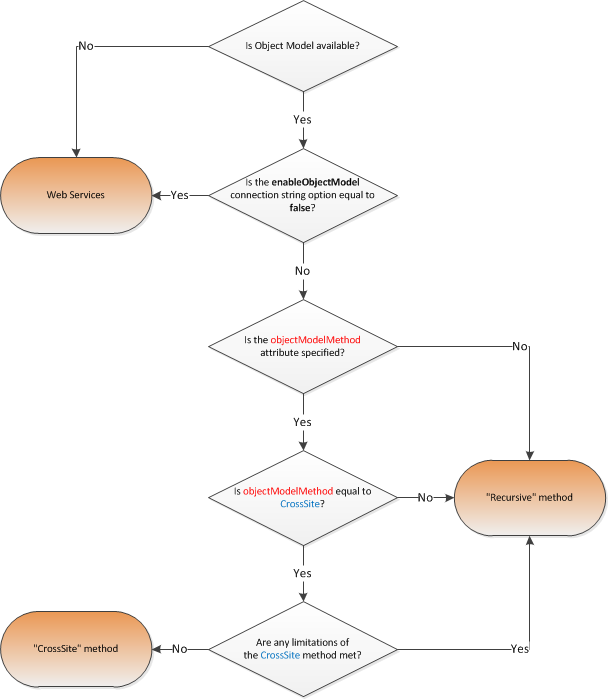
Section titled “Method Selection Workflow”When the Object Model is enabled (and your report server configuration allows its use), the default behavior is to use the Recursive method, you can change the method used by setting the objectModelMethod attribute of the rollUpLists statement to CrossSite . However, Enesys RS Data Extension will revert automatically to the Recursive method if it happens that your query is incompatible with CrossSite method limitations (i.e.: multi-value fields…).
Here is a schema that summarizes how Enesys RS Data Extension will determine the method that will be used:
General Guidelines for choosing a method
Section titled “General Guidelines for choosing a method”To conclude, we propose you a summary table of the preferred methods, depending on the number of lists and items to retrieve.
List size Number of lists | Small to medium lists | Large lists |
| Few lists |
|
|
| Many lists |
|
|
Please note that this is just a general guideline. Performances will depend on several parameters (your server memory, the number of lists, items and columns selected in the query, the user permissions…) that we haven’t included here for keeping things simple.
The following chart shows various measures over a sample site collection:
- The site collection contains 10 100 sites
- 101 000 items are retrieved in all 5 cases
- The items are split up into a different number of lists (horizontal axis)
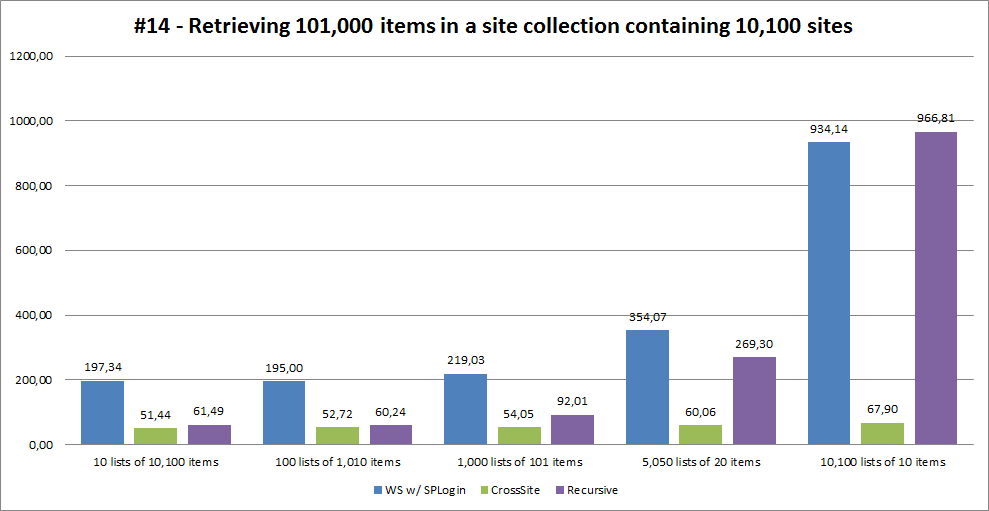
In our tests, CrossSite performances start to drop when retrieving 250,000+ items with 8 columns.
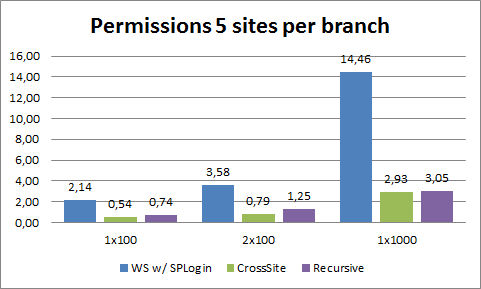
Another area where both CrossSite and Recursive methods are far more efficient than the Web Services approach is when a report is run under the credentials of the current user and that user has only access to a small set of the available lists.
The following chart highlights this by comparing the 3 methods when retrieving items from a site collection of various sizes (100 sites, 200 sites and 1000 sites) for a user that has only permissions to 5 sites within the collection.