SPLogin credentials
SharePoint Web Services used for enumerating web sites, need credentials with SharePoint “Browse Directories” permissions on each site and sub-site starting from the starting site specified in rollUpLists statement ( relativeSiteUrl attribute).
This is obviously a major constraint when rolling up lists items for the user running the report (when using Windows Integrated security credentials at the data source level).
To overcome this limitation, it is possible to specify an account with sufficient permissions for enumerating web sites. This account should be specified inside the Server and Client Configuration tools.
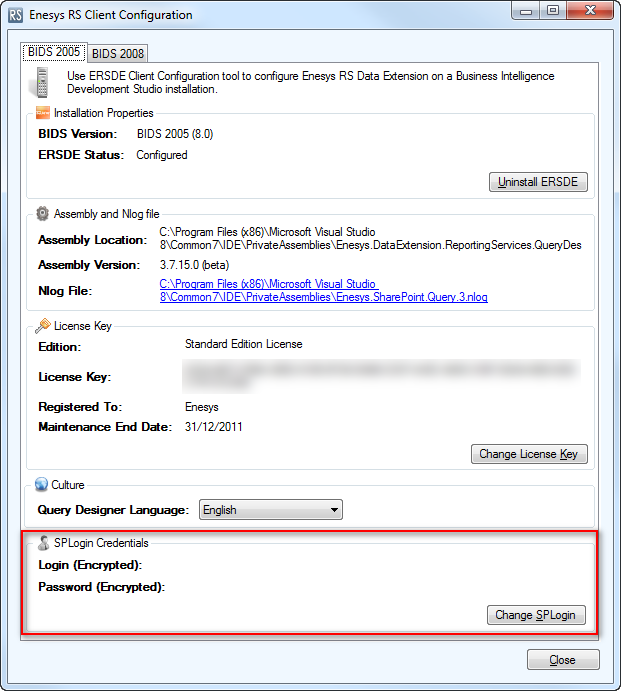
Click on the “Change SPLogin” button and enter the login/pass of an account with enough rights to enumerate web sites.
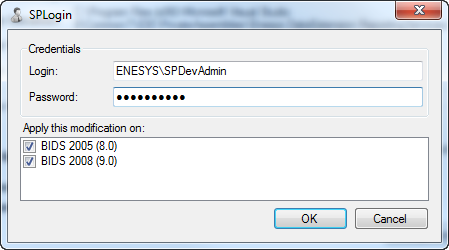
Login and password are encrypted using “Data Protection API”. Data (Login and Password) can only be encrypted on the machine where you would like to configure a SPLogin element. This data can only be decrypted on the same machine. We neither use nor store any key and only rely on .net API to use machine store.
Please note that if no SharePoint login is configured, Enesys RS Data Extension will try to enumerate web sites using credentials specified at the data source level and will throw an exception in case of insufficient permissions.
Please note that the encrypted information is only valid for a specific machine. You will have to encrypt account information on each machine running Enesys RS Data Extension even if it is the same account.