Version 3.0
Logging errors
Section titled “Logging errors”A logging framework has been implemented for logging errors as well as trace and debug information if necessary.
You enable logging by having a configuration file named “Enesys.ReportingServices.Ersde2008.nlog” in the same folder as Enesys RS Data Extension ’s dll.
For more information see “ Logging_Configuration ” page .
New statement “sqlQuery”
Section titled “New statement “sqlQuery””The sqlQuery statement represents the major new feature of Enesys SharePoint Query 3 . The sqlQuery statement makes it possible to write a SQL Query for manipulating SharePoint lists retrieved using list , mergeLists , rollUpLists or administrative ( aListCollection , aListPermissions …) statements.
As an example, the following query will return “Suppliers” list’s items that are not in “Other Suppliers” list.
<root xmlns="http://enesyssoftware.com/schemas"> <list title="Suppliers" relativeSiteUrl="/sites/demo/"     tableName="Suppliers">   <fields>Title, Company, WorkCountry</fields>   <query></query> </list> <list title="Other Suppliers" relativeSiteUrl="/sites/demo/"     tableName="SpOtherSuppliers">   <fields>Title</fields>   <query></query> </list>
 <sqlQuery tableName="OtherSuppliers">   SELECT Suppliers.*   FROM Suppliers LEFT JOIN SpOtherSuppliers ON Suppliers.Title =      SpOtherSuppliers.Title   WHERE SpOtherSuppliers.Title IS NULL </sqlQuery> <resultSet>OtherSuppliers</resultSet></root>
Because Enesys SharePoint Query relies on SQLite engine, the SQL Syntax you can use in sqlQuery statements is limited to the syntax provided by SQLite implementation.
For SQL syntax details, go to the following address: sqlite .
The advent of the sqlQuery statement obviously makes sqlOp statements obsolete though Enesys SharePoint Query 3 is still capable to execute them. It is recommended to replace sqlOp statements with sqlQuery equivalent statements when migrating.
meetingInstanceId attribute
Section titled “meetingInstanceId attribute”The meetingInstanceId attribute can now be passed as a report parameter (e.g.: meetingInstanceId =” @meetingInstance! ” )
webCulture attribute
Section titled “webCulture attribute”It is not necessary anymore to specify a webCulture attribute when retrieving item versions even when site’s regional settings differ from reporting services current execution culture.
timeZone attribute
Section titled “timeZone attribute”When retrieving item versions, you may have some issues with dates that are not retrieves in the site’s time zone. You can specify the new timeZone attribute to convert these dates.
You can find the time zones list in this webpage in the chapter “The World’s Time Zones”.
Soap Exception
Section titled “Soap Exception”More detailed information is provided when a SharePoint Soap Exception is thrown by SharePoint web services. Even though the error returned by SharePoint is not always meaningful it may help at some point to understand the origin of the error.
Most soap exceptions resulting from invalid column names being used within a CAML Query ( query element inside a list statement) we are now checking that valid columns are used as part of the query element and provide with a meaningful error when this is not the case.
Recurring Events
Section titled “Recurring Events”Various bugs regarding recurring events exception have been fixed. A new
automatic mode is available for expanding recurring events. In automatic
mode, it is not necessary anymore to filter items (events) based on
start and end date. See “ ESQD_Expanding_recurring_events ” and
“ESQ_expandRecurrent ” chaptersfor more information.
resultSet statement
Section titled “resultSet statement”resultSet statement is not mandatory anymore. When no resultSet statement is specified, the resulting data from the latest query statement will be returned.
Breaking Changes
Section titled “Breaking Changes”Query validation
Section titled “Query validation”Overall, this version is less relaxed regarding syntax elements that were simply ignored in the previous version. The reason behind this new approach is that one could easily make invalid assumptions about the resulting data because of some typo:
An error is thrown when:
- an invalid statement is used,
- more than one resultSet statement is specified,
- a tableName attribute is empty,
- a tableName attribute is duplicated,
- …
Final version will add even more validation.
Recurring Events
Section titled “Recurring Events”expandFirstDate and expandLastDate attributes are now mandatory when expanding recurrence.
multiList statement
Section titled “multiList statement”When no type attribute was specified in previous version, multiList would default to “ MergingList ”. The attribute must now be set explicitly with a valid value.
Retrieving all non hidden fields
Section titled “Retrieving all non hidden fields”It is now possible to specify a ‘*’ within a fields element in order to
automatically retrieve all non SharePoint hidden columns. For
performance reasons, it is recommended to use this approach when you do
not want to specify each column rather than leaving empty the fields
element. See “ ESQ_fields_element ” for more information.
Querying over multiple SharePoint Web applications
Section titled “Querying over multiple SharePoint Web applications”We now officially support the specification of an absolute URL instead of a relative site URL in query statements. For this to work, you need to specify an empty server URL in the data source definition as shown in the following screen shot:
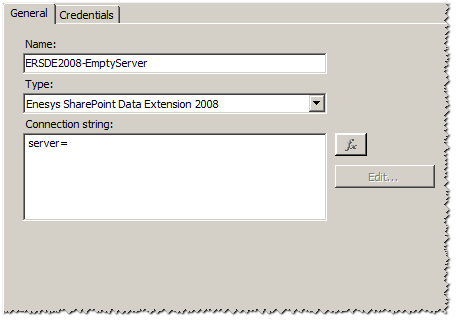
Though you are losing the ability to report over different SharePoint servers (dev, production …) by only switching from one data source to another, this approach lets you retrieve and aggregate data over multiple SharePoint Web applications.
Rolling up list’s items
Section titled “Rolling up list’s items”We have changed significantly rollUpLists statement processing to overcome limitations due to the necessity to have “Browse Directories” permissions for enumerating web sites through SharePoint web services. When rolling up lists for the user running the report (using Windows Integrated Security credentials), this proved to be a major constraint limiting its use.
It is now possible to configure a specific login for enumerating web sites without relying on the credentials defined at the data source level. However, lists items are retrieved using the credentials defined at the data source level.
For more information see “
ESQ_Using_a_specific_account_for_enumerating_web_sites ” .
Direct support for multi-value parameters
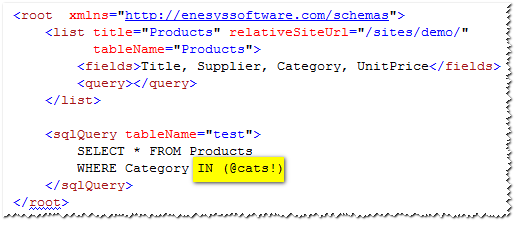
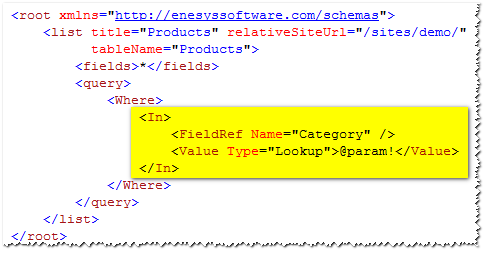
Section titled “Direct support for multi-value parameters”Multi-value parameters are now directly supported by Enesys SharePoint Query .
More specifically, you can use a multi-value parameter in the following contexts:
sqlQuery statement with an IN clause:
Pseudo Caml Query In operator (new in this version):
When used in other contexts where a single value is expected, multi-value parameters will be considered as a string containing multiple values separated by a comma.
New pseudo CAML Query operators: In and NotIn
Section titled “New pseudo CAML Query operators: In and NotIn”Enhancing direct support for multi-value parameters, we have extended CAML Query in order to support In and NotIn operators.
Using In at the CAML Query level rather than relying on the equivalent sqlQuery statement will improve performances considerably when using medium to large lists (by a factor of 2 to 10).
For more information about these operators, you can see “
ESQ_In_operator ” and “ ESQ_NotIn_operator ”.
New pseudo CAML Query IfNot modifier
Section titled “New pseudo CAML Query IfNot modifier”The new IfNot element acts as a modifier for the Eq operator in order to allow you to retrieve either all items or items filtered on a specific value.
The idea is to permit the “ALL” or “Some value” filtering scenario without relying on an additional sqlQuery statement and mostly, with much improved performance than the equivalent sqlQuery statement.
For more details about this element, see “ ESQ_ifNot_Element ”.