survey statement
The survey statement lets you retrieve data from SharePoint lists of type “Survey”.
Due to the specificity of Survey lists, the list statement is not appropriate for making reports out of Survey lists. It is mostly due to the fact that storing an answer inside each returned column is not a viable scenario. It is for those reasons that a specific survey statement was developed:
<survey title="" listID="" relativeSiteUrl="" tableName="" expandMultiValues="" includeAllOptions="" multiValuesSeparator="" rowLimit="" paging="" stripHtml=""> <query>...</query> </syncList>Contrary to the list statement, the survey statement returns a fixed schema that doesn’t change according to the list columns. The following table describes this schema:
| Field | Description |
|---|---|
| QuestionID | An auto-increment ID, each question having a different ID. |
| FieldType | The type of the SharePoint field (Text, Number, Choice, GridChoice…). |
| FieldName | The display name of the field (the question title). |
| GridStartNum | Only used with GridChoices. Represents the first available number. |
| GridEndNum | Only used with GridChoices. Represents the last available number. |
| GridTxtRng1 | Only used with GridChoices. Contains the text representing the first number. |
| GridTxtRng2 | Only used with GridChoices. Contains the text representing the middle number. |
| GridTxtRng3 | Only used with GridChoices. Contains the text representing the last number. |
| GridNATxt | Only used with GridChoices. Contains the text used for the “N/A” option. It may be null if the “N/A” option is not available for this GridChoice. |
| SubQuestionTitle | Only used with GridChoices. Contains the name of the GridChoice option. |
| Choice | Contains the possible values of this question. |
| AnswerID | Contains the ID of the user answer. |
| Value | Contains the user answer to this particular question. |
For example, if your Survey is composed of 10 questions, you will have about 10 lines returned for each answer (the number may vary depending on the question types and the statement options used).
Contrary to the list statement, the survey statement doesn’t allow you to select the fields to include inside the result set; all the questions are automatically included.
Combined with the fixed schema, it allows to:
- Automatically update the report if the question changes: the questions that are added, updated or removed are taken into account without any change to make to the report.
- Use the same report for any Survey list: by using parameters inside the title and relativeSiteUrl attributes, you are able to query any Survey list and use the same report.
survey attributes
Section titled “survey attributes”Specifies the title of the SharePoint list of type Survey from which you want to retrieve the data.
The title attribute may be specified using a global variable (e.g.: title =“$title!” ), or using a query parameter (e.g.: title=“@title!” ).
listID
Section titled “listID”Represents the GUID of the SharePoint list from which you want to retrieve data. Though not specifically self-describing, the list GUID has the advantage of not changing over time even if the list title is modified.
Note that if you specify both title and listID attributes, the later will take precedence.
The listID attribute may be specified using a report parameter (e.g.: listID = ” @list! “).
relativeSiteUrl
Section titled “relativeSiteUrl”URL of a SharePoint site containing the list. This URL is relative to the SharePoint site as it is defined in the data source. This approach was chosen to make it possible to easily move from a SharePoint test server to a SharePoint production server by simply modifying the data source.
The relativeSiteUrl attribute may be specified using a report parameter (e.g.: relativeSiteUrl =” @url! ”) or a global variable (e.g.: relativeSiteUrl = ” $siteUrl! “).
tableName
Section titled “tableName”This attribute makes it possible to assign a name to the set of data retrieved from your SharePoint list.
Though not extremely useful (but still mandatory) when you retrieve data from a single list, this name will be the basis for applying operations between SharePoint lists.
expandMultiValues
Section titled “expandMultiValues”Optional Boolean, it specifies whether the columns containing multi-values should be expanded.
Each multi-value will be duplicated so that each value will be stored in an item, creating as many items as values inside the multi-values.
Default value is false .
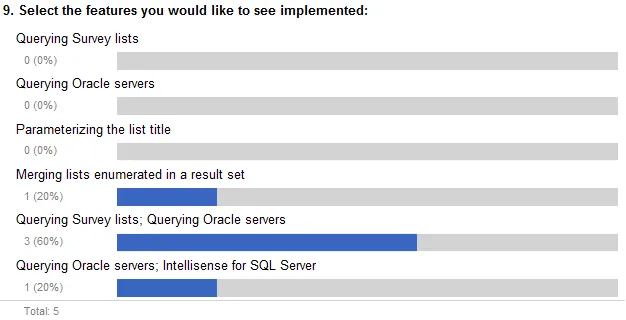
For example, with expandMultiValues =“false” , the multi-values are not expanded:
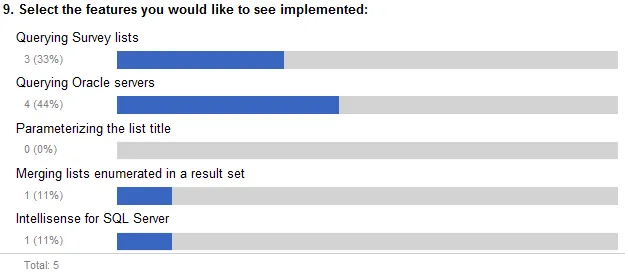
With expandMultiValues =“true” , the multi-values are expanded:
includeAllOptions
Section titled “includeAllOptions”Optional Boolean, it specifies whether all the possible options should be included, even if no user selected those choices.
Default value is true .
For example, with includeAllOptions =“true” :
Even if the “Querying Survey lists”, “Querying Oracle servers” and “Parameterizing the list title” options were not chosen, they are still included inside the results.
With includeAllOptions =“false” , the options that are not selected are not included:
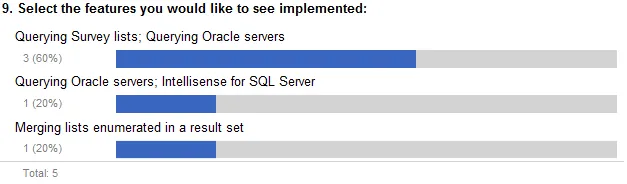
Setting the includeAllOptions value to false is particularly useful when you want to report on a single answer.
note
All the possible values for GridChoice (Rating scale) columns are always returned, even if the includeAllOptions is false . This is to simplify the display of the answer within a scale, as a single value may not be very deterministic.
multiValuesSeparator
Section titled “multiValuesSeparator”Optional. Specify a string that will be used as a separator for multiple values columns: MultiChoice, Lookup and Person or Group.
The default separator is ”; ” to match SharePoint default behavior.
rowLimit
Section titled “rowLimit”Optional. Specify the number of distinct answers returned by the survey query statement (please note that the number of items returned depends on the number of questions, therefore, returning a single answer may return several items).
paging
Section titled “paging”Optional. The paging attribute lets you specify how many answers at once should be retrieved from the list. Enesys SharePoint Query will retrieve answers in chunks of the number specified with the paging attribute.
By default, Enesys SharePoint Query will retrieve answers from a SharePoint survey in chunks of 2000. However, if you want to put less pressure on your SharePoint server, especially if the Survey has a large number of questions, you may want to specify a lower number.
stripHtml
Section titled “stripHtml”Optional Boolean. When set to true , specifies that html tag should be stripped from SharePoint columns containing html.
The default value is false .
query element
Section titled “query element”The query element allows you to filter the answers. Its usage is similar to the usage inside the list statement. For more information, see the “ ” of the list statement, page .