Version 3.6 of Enesys RS Data Extension introduced interesting features that makes it possible to combine both InfoPath promoted and non promoted fields in a single report. The approach however involves using sub-reports (and therefore multiple queries) and does not allow manipulating both data as a single dataset.
In version 3.7, we will be providing a brand new statement dedicated to InfoPath forms:
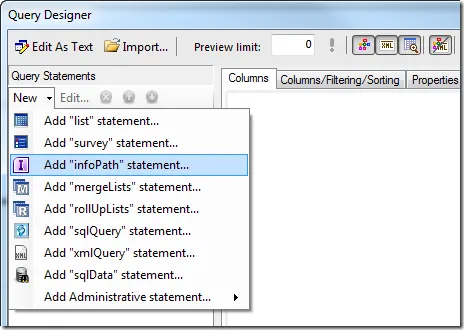
This new statement will let you select data from both InfoPath promoted and non promoted fields:
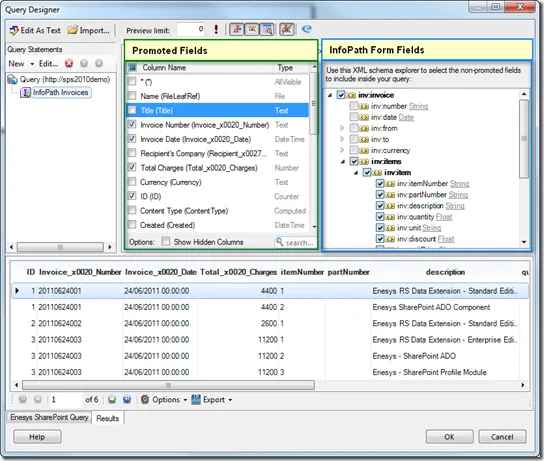
As you can see from the above screen shot, you can select fields from both the underlying list (promoted fields) and from the XML InfoPath form.
Note that because the structure is being taken from the schema, Enesys RS Data Extension is able to return the data using the proper data type.
The new InfoPath statement lets you easily handle 1-n relations within an InfoPath form. If you look at the resulting data in the previous screen shot, you will notice that you get multiple rows for each InfoPath item as a result of selecting the invoiced items as part of the query. As a result, you can now pivot your data the way you like.
Starting from InfoPath Invoice forms, we can easily build a report that will display invoice data grouped by invoice item as shown in the following screen shot:
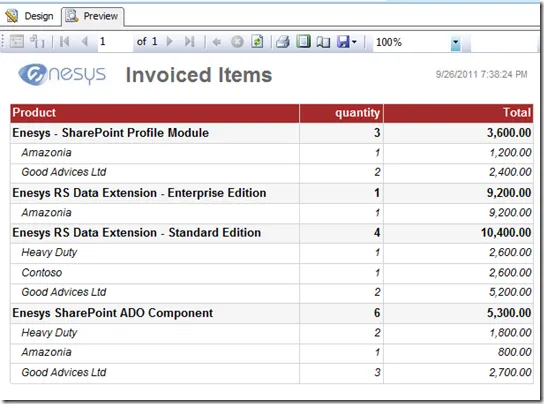
Enesys RS Data Extension version 3.7 full InfoPath support will bring an analytical dimension to your InfoPath data.