The XmlQuery statement lets you retrieve and manipulate XML data from an URL you specify. With previous versions of Enesys RS Data Extension, you were bound to use an XPath expression to specify the data you wanted to retrieve from your XML data. Though this may be satisfying in many cases, you may need to retrieve data from a more complex XML structure that would not translate using a single XPath expression.
Capitalizing upon the recent developments on the InfoPath statement, the XmlQuery statement now offers a similar approach for selecting data (ElementPath) in addition to the XPath expression that is still supported.
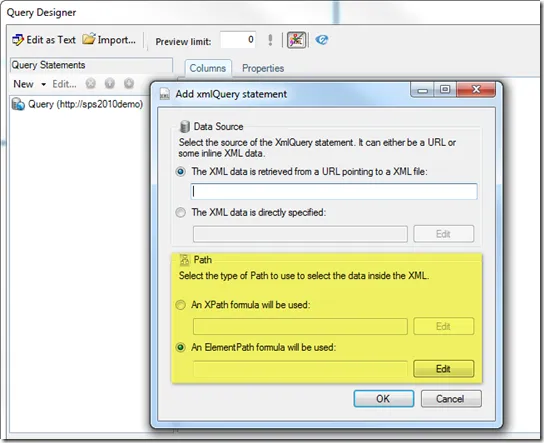
When creating a new XmlQuery statement, both options are proposed as shown in the following screen shot:
ElementPath approach
When using the new ElementPath approach, you will be able to specify the data you need with more precision than using the XPath approach.
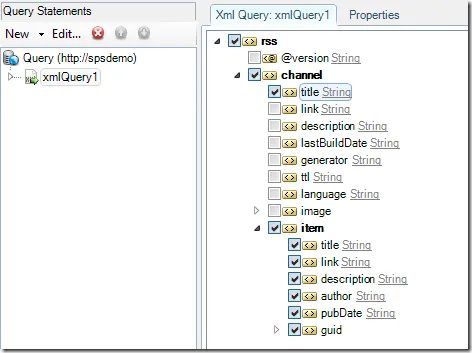
Moreover you get you get the same designer control that is available with InfoPath statement:
XPath approach
The XPath approach is the only available method with version 3.7 and earlier. It lets you write an XPath expression to specify the data you would like to retrieve from your XML data. Though it has some limitations when you want to deal with retrieving data at various level of your XML hierarchy, it can also be quite helpful when you want to retrieve nodes whatever their position in your XML schema.
Enesys RS Data Extension 3.8 brings two improvements to the XPath approach.
XML Schema viewer
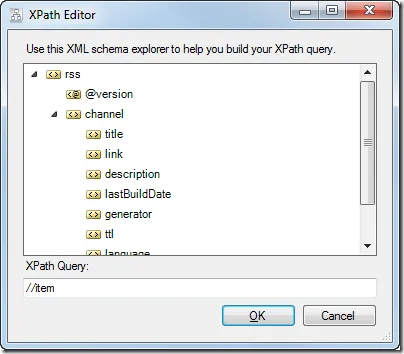
You can view the XML schema while writing your XPath expression.
Field Selection
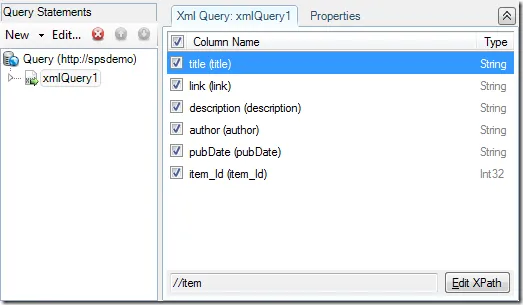
When using an XPath expression, you don’t have much control on the elements/attributes returned by the expression. Say you use an expression like “//Item”, you would end up having all the child element of “Item” being converted to fields in your query.
You can now select the fields to include:
Conclusion
Enesys RS Data Extension 3.8 brings many other features detailed in the following articles:
- Distinct field values revisited
- Retrieving values from a SharePoint Choice Column
- Run queries up to 50 times faster with Statement Filtering
- Visual Query Designer Improvements
- SQL Server Reporting Services 2012 compatibility
- Merging Multiple Lists
Enesys RS Data Extension 3.8 Beta is available for download. Do not hesitate to give it a try.