Using this approach you can improve tremendously the performances of specific queries. Let’s take the following scenario as an example:
Scenario
Let’s consider an “Issue List” for handling issues for various software components.
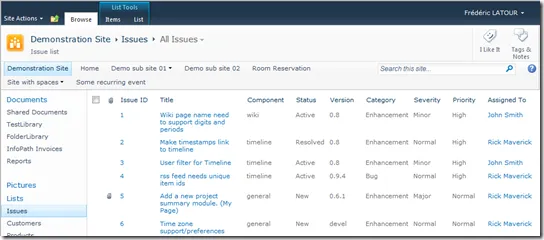
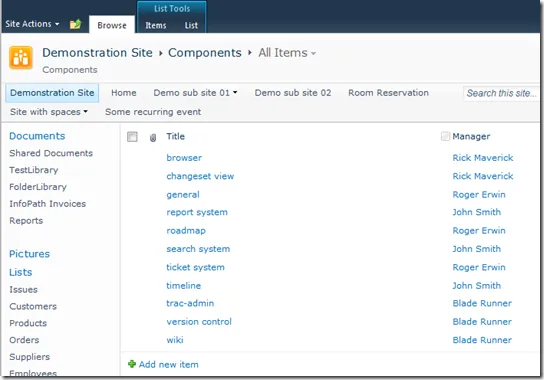
Component development is under the responsibility of a manager. Therefore, we are maintaining a separate list of components and their assigned manager:
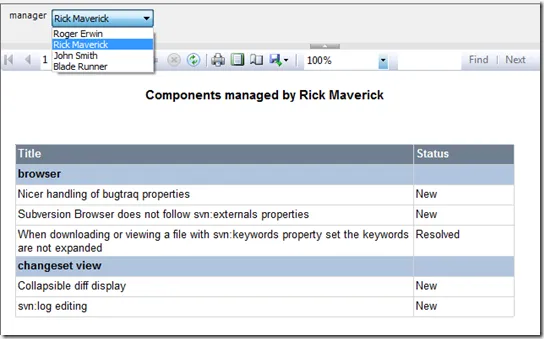
Now we would like to have a report that displays the issues for the components managed by a specific manager. Basically, the resulting report would look something like the following one:
Building the report
Let’s first build the report without taking advantage of the new statement filter feature available in version 3.8. We will then explain why performances may not always be what you can expect in that situation. Finally, we will introduce the “Statement Filter” feature and explain why it can greatly improve performances.
In order to design our report, we will need a dataset that will return the issues for the components that are managed by a specific manager selected at run time.
Obviously, we will need a query that joins Components and Issues. If you are already using Enesys RS Data Extension, this is a pretty basic query to come up with:
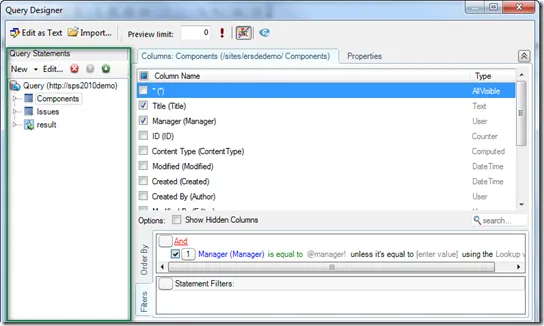
If we concentrate on the Query Statements area, we can see the 3 statements that compose the query:
- Components will retrieve data from the components list,
- Issues will retrieve data from the Issues list,
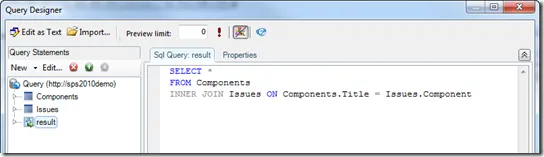
- result is a statement that uses SQL Select syntax to join both Components and Issues.
Now let’s focus on each statement.
Components
Besides selecting only the specific fields needed in our report, we need to filter out the components that are assigned to a specific manager. The manager will be selected by the user running the report.
In order to do this, we just need to add a filter that says that “Manager” must be equal to the report parameter we specify (@Manager!). This is exactly what is shown in the following screen shot:
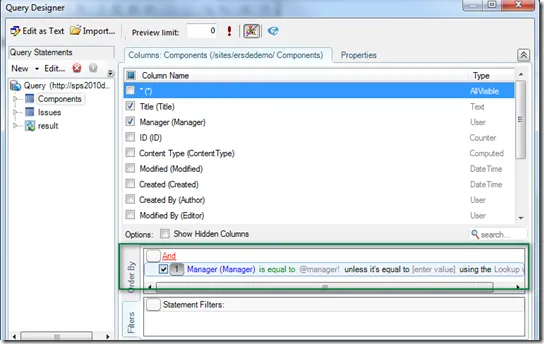
Notice the syntax used for report parameters: a parameter name surrounded by @ and !.
In version 3.8, the user interface for specifying parameters was somewhat improved. Parameter can be specified using a dialog box without having to deal with specific delimiters. More information on interface improvements will be available in a separate article.
Issues
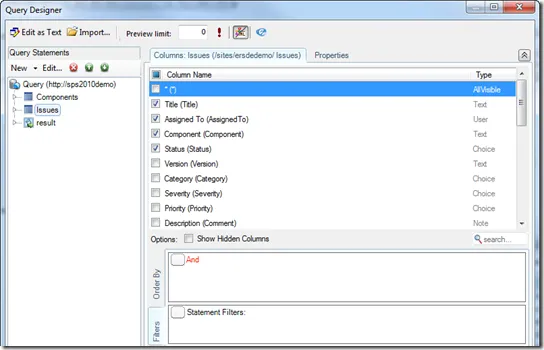
The “Issues” statement is being used to retrieve issues from the SharePoint list. Only the fields that are needed for the report are selected (when you do not select any fields, all fields will be returned – including hidden ones - which has usually a major impact on performances).
Result
The “result” statement is used to join both Components and Issues. The SQL Select statement is straightforward. Moreover, the visual query designer offers intellisense features that makes it really easy to write such queries.
Report Layout
Now that we have created our dataset with the appropriate query, we just need to design the report layout which is quite simple in our example.
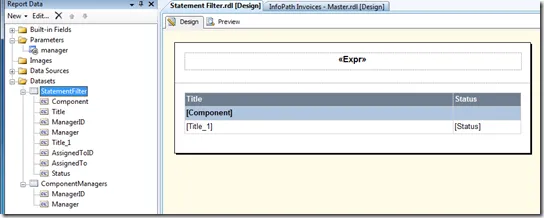
We won’t go into the details of designing the report in order to focus on explaining how “Statement Filter” can help in achieving much improved performances.
By looking at the screen shot, you will note however that we are using another dataset: “ComponentManagers”. You may have guessed that this statement is being used to specify the available values for the “manager” report parameter. By connecting the dataset with the parameter, the user will be able to select a manager from a drop down list at report runtime.
Statement Filtering
At this stage we have a report that works perfectly.
So what is wrong with this report and, more specifically, this query? Well, nothing is wrong except that if you have a medium to large “Issues” list, performances may not be what you would expect while displaying a few issues assigned to a specific manager.
The reason is that, in any cases, the query will always retrieve all issues from your SharePoint list. Issues filtering is done afterward by (inner) joining only those components that are assigned to the selected manager, to all issues. Obviously, if this results in having a few issues selected/displayed, loading the whole Issue list may take some time depending on how many items your list contains.
In order to overcome this limitation, Enesys RS Data Extension 3.8 adds the “Statement Filter” feature that can improve performances in quite an amazing way … no we are not exaggerating here but more on this later.
The general principle of “Statement Filter” is that you can use the resulting data of another statement in order to filter at the SharePoint list level (as opposed to filtering once the data is retrieved). In our example this will translate in retrieving only the “Issues” for which component is in the components retrieved from the “Components” list. With this approach, instead of retrieving potentially thousands of items, we would only retrieve the issues related to the components assigned to the selected manager. This can make a huge difference as you can imagine.
Adding a Statement Filter
Let’s now have a look at how we create a statement filter. Starting from the query you have just created, you will see how easy it is to add this feature. You don’t have to change your query completely. The only thing you have to do is to add a “statement filter” to the “Issues” statement.
Indeed, Enesys RS Data Extension 3.8 provides a new “Statement Filter” area as shown on the following screen shot:
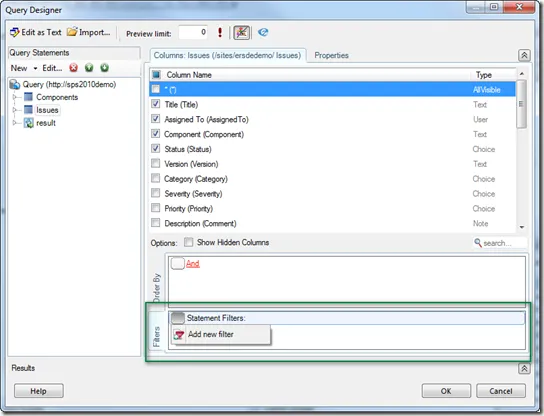
In order to get filter out the issues with the components retrieved in the “Components” statement, we will add a new filter and specify the following information:
- the field (in the Issue list) which value will be compared to some field in another statement (Component in our example).
- the source statement/list that contains the data used to filter the current list (Components in our example)
- the field (in the source statement) used to compare value with the field we specified for our current list (Title in our example – Title contains the component name).
The following screen shot shows the completed Statement Filter:
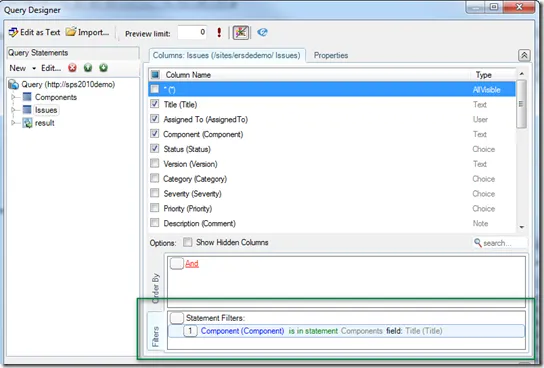
You can read it this way: retrieve the Issues items for which the field “Component” is IN the values of the field “Title” from the “Components” statement.
Adding this “Statement Filter” is the only change that is needed. Depending on how many items is available in the Issues list, you could be surprised by the resulting performance.
Performances
Let’s see now how much performance improvement you can expect depending on the following elements:
- the number of components assigned to the manager selected at run-time using a report parameter.
- the number of issues for those components.
- and finally, the total number of Issues in the list.
| # Components for the selected manager | Issues for the selected components | Issues (total items) | Performance improvement in % |
|---|---|---|---|
| 100 | 384 | 10 000 | 450 % |
| 100 | 992 | 83 000 | 2 400 % |
| 1 000 | 3 728 | 10 000 | 29 % |
| 1 000 | 9 909 | 83 000 | 200 % |
| 10 | 38 | 10 000 | 500 % |
| 10 | 98 | 83 000 | 5 800 % |
| 1 | 4 | 10 000 | 3 600 % |
| 1 | 10 | 83 000 | 6 000 % |
Notes:
Indeed, the performance improvement can be huge because Statement Filtering makes it unnecessary to load the entire “Issues” list (and we are talking of large lists here).
We did not provide performance measures in absolute value as it can depends on many factors (Integration mode or not, performance of your machines, …) but some reports that would take 45 seconds without Statement Filter could take just two seconds.
The bigger the Issues list, and the fewer the resulting issues, the better performance improvement, you can expect.
Conclusion
Obviously, this is a specific scenario and “Statement Filter” feature will only improve performances with this scenario. This is however not an exotic scenario. Each time you have some report that displays the details of some specific item (selected at run-time using a report parameter) which data is spanned over multiple related lists, there are some chances that you can use “Statement Filter” feature and enjoy getting instant reports display.