With Enesys RS Data Extension 3.5, it is already possible to use a report parameter for specifying the relative site URL of the SharePoint site containing some list you would like to use in a report. Said another way, you can decide at report run time the SharePoint site that will be used in your report.
However, it is not possible to specify the list name using a report parameter. You have to know the list name at design time. That means that you can use the same report on different lists located in different sites until the list has the same name. This is obviously not always practical.
With Enesys RS Data Extension 3.6, it will be possible to specify the list name using a report parameter. And while we were at it, we have worked on removing the annoyances associated with the use of a report parameter for specifying the relative site URL and have provided a user interface within the query designer.
User Interface
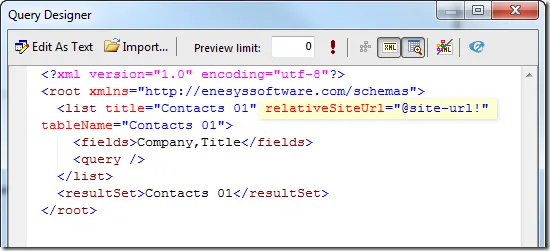
In version 3.5, it was necessary to switch from the Visual Editor to the XML editor in order to specify a report parameter for the relative site URL, as shown in the following screen shot:
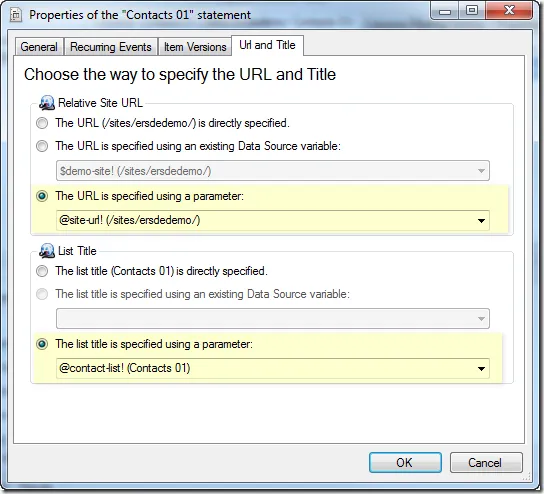
In Enesys RS Data Extension 3.6, this is not necessary anymore. The Visual Editor now offers the possibility to specify a report parameter for both the list title and the SharePoint site URL:
Parameter prompting
We have also worked on an annoying side effect of using a report parameter for the relative site URL (and the title in version 3.6). A few background information is necessary:
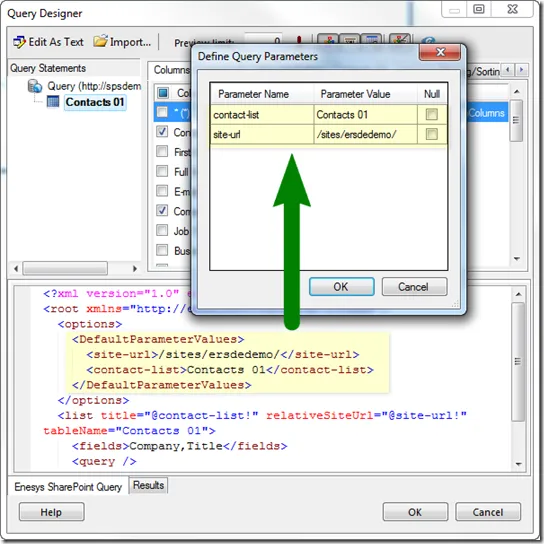
When designing a report, it is necessary to get the schema of the lists being used within your report at various stages of the design process. When using a report parameter for specifying the SharePoint site where the list is stored, there is no way to get the schema without being provided real URL where the list can be found. This is why you are being prompted to enter the parameter value in various occasions while designing the report. Moreover, because of some limitations of BIDS, the values are not cached and you need to enter them each time it is necessary to access the list schema.
In order to overcome this limitation and to provide a much improved user experience while designing reports that use report parameters for specifying the SharePoint site URL and/or list title, Enesys RS Data Extension will keep the default parameter values within the query. Those values will be used automatically when the query designer needs to access the list schema and will save you the need to enter the values each time: