Even though it is already possible to join both SQL Server data and SharePoint lists in the current version by using the “xmlQuery” statement (see this article) we have gone a step further in the coming version (3.4) of Enesys RS Data Extension (Standard and Enterprise edition only) in order to make the process plain simple.
When using the “xmlQuery” statement, you need to have an “aspx” page (or whatever technology you like) that will query the Database and return the data into XML format so that it can be consumed by Enesys RS Data Extension. That was better than nothing but somewhat tedious.
With the addition of our new “sqlServerQuery” statement things are much more straightforward.
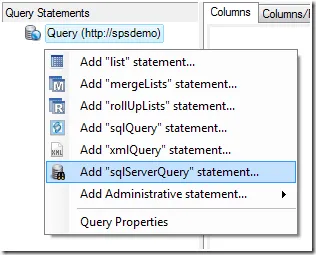
This new statement will let you specify a connection string to your database within the integrated query builder as shown in the following screen shot:
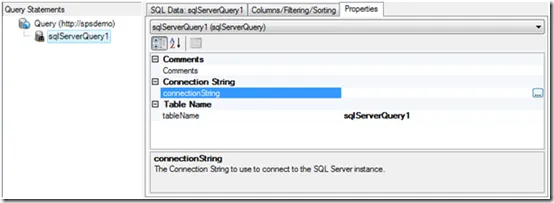
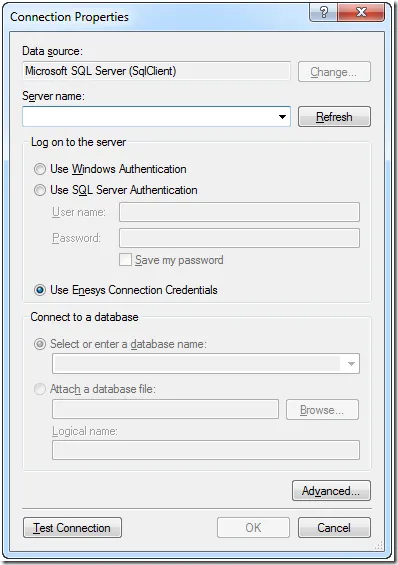
You can click on the button to the right in order to open the Connection properties dialog box and specify the connection to your own SQL Server Database. Note that you can use the data source credentials for querying the Database without having to store any credentials information within the query itself. We have however let the possibility to enter specific credentials:
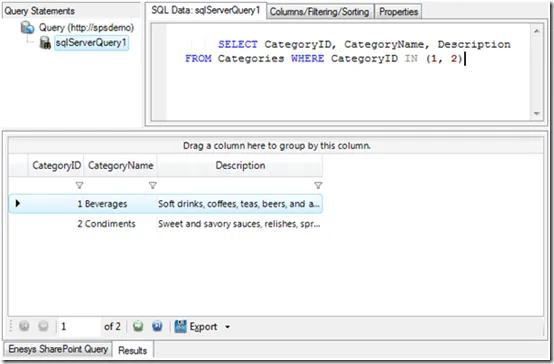
Finally, you can just specify the SQL SELECT statement that will be used to retrieve data from your SQL Server Database. You can click execute within the Query Designer in order to have a look at the data returned by your query and you can join this data with SharePoint lists by adding some “List” statements:
We hope you will enjoy this new feature.