In the first part of this article, we have provided some details on some exciting new features that will be available in the next version of Enesys RS Data Extension and Enesys IS Data Extension:
- Support for Form Based Authentication
- Improved performance when retrieving item versions
- Improved user interface,…
You can already test those features using the public beta available for download.
The coming version will also include tremendous performance improvements when rolling up list items using the RollUpLists statement.
Introduction
Retrieving items from a single SharePoint list through Web Services is not slower than using SharePoint Object Model in most cases. It can even perform better due to the smaller overhead.
Rolling up items in multiple lists within a site collection is however quite different. Because of the limited options provided by the available web services, using the SharePoint Object Model offers opportunities for quite substantial performance improvement.
Because more and more Reporting Services installations are taking advantage of SharePoint integration mode approach, we have decided to include alternative Object Model approaches when the report server configuration will make it possible.
FAQ
Q. Are there any specific requirements for getting improved performance?
Yes. You need to have Reporting Services installed in SharePoint Integration mode (Reporting Services in Stand-alone mode installed on a SharePoint WFE should also provide the necessary requirements – we will confirm this later).
Q. Any figures on the expected performance improvement?
There are many factors that can affect the overall performance improvement on a specific query (number of sites in the entire site collection, number of sites to roll-up, if the lists is available in all sites, number of items, …). However, you could experience from 10% to 500% (even more in some very specific cases) depending on your queries and configuration.
Getting into details
Things are not as trivial as it may seem initially and we have to set up many different configurations and explore various approaches. You could roll-up items in a list that is only available in 10 sites out of 5000 in a site collection, you could roll-up items in 1000 lists or the user running the report could end up having permissions on a single list out of 2000 available in the entire site collection.
We will provide details for various scenarios and provide figures using the various approaches we have explored. This will also be compared with the approach currently used in Enesys RS Data Extension. Please note that the benchmarks have been done using small lists, in order to focus on roll-up mechanics.
Before you get too much excited with the performances of the “SiteDataQuery” approach, you have to know that this particular approach has some limitations and can’t be used for all kind of queries. More specifically, it has the following limitations:
- you can’t select “lookup” fields that accept multiple values (including Person or Group fields with multiple values),
- you can’t use “discussion boards” lists.
- You can’t specify a specific folder.
For each scenario, we will be providing some charts for comparing the performances of the various approaches. Here is additional information so that you can properly interpret the results:
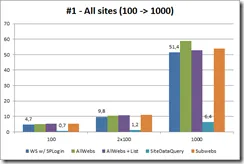
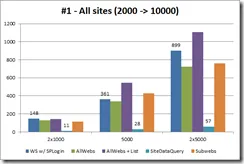
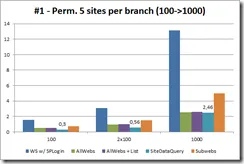
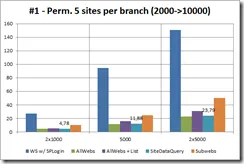
- x-axis represents the number of sites in the collection. “2x100” means two branches containing 100 sites each.
- y-axis represents the time necessary to complete the operation (less is better).
- WS w/SPLogin series represents the current Web Services approach with a properly configured SPLogin account.
- All other series (AllWebs, Subwebs, SiteDataQuery, …) represent different variations based on the model object that we have explored.
Scenario 1
- The lists we are rolling-up are available in all sites in the collection.
- We are rolling up from the root of the site collection.
- The user has the necessary permissions on all sites and lists.
Comments:
SiteDataQuery outperforms the competition.
The “Web Services” approach works in par with other Object Model approaches (except for SiteDataQuery). This was somewhat expected considering that we will retrieve items in all sites. There is therefore not much room for optimization.
Scenario 1bis – permissions variation
- The lists we are rolling-up are available in all sites in the collection.
- We are rolling up from the root of the site collection.
- The user has permissions on 5 sites per branch.
Comments:
All Object Model approaches outperform the Web Services approach. The Object Model provides fine grained control that makes it possible to discard lists not available to the users in a more efficient way.
Scenario 2
- The lists we are rolling-up are available in only 10 sites per branch.
- We are rolling up from the root of the site collection.
- The user has the necessary permissions on all sites and lists.
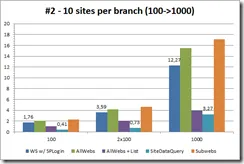
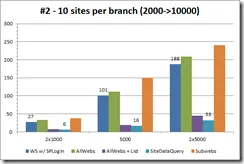
Comments:
This scenario highlights situations when you roll-up a list that is only available in a few sites inside a medium to large site collection. “SiteDataQuery” is still the best performer.
The “AllWebs+List“ object model approach that has not the limitations of the “SiteDataQuery” approach shows interesting performances in that situation.
Scenario 2bis – permissions variation
- The lists we are rolling-up are available in 10 sites per branch.
- We are rolling up from the root of the site collection.
- The user has the necessary permissions on 2 sites per branch.
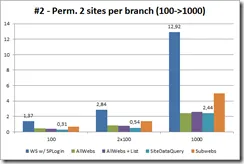
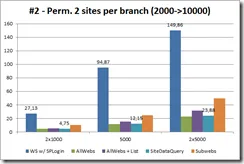
Comments:
For the exact same reasons explained in Scenario 1bis, the Web Services approach performs poorly and you can expect great performance improvements in such scenario.
Scenario 3
- The lists we are rolling-up are available in all sites.
- We are rolling up from a single branch in the site collection.
- The user has the necessary permissions on all sites and lists.
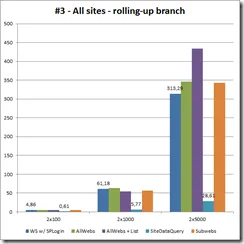
Comments:
In this scenario, we are rolling up items from lists available in a specific branch in our site collection (and not the root).
“SiteDataQuery” approach when possible is obviously the way to go.
Web Services approach has performances similar to “Object Model” approaches (except SiteDataQuery).
Scenario 3bis – permissions variation
- The lists we are rolling-up are available in all sites.
- We are rolling up from a single branch in the site collection.
- The user has permissions on 5 lists.
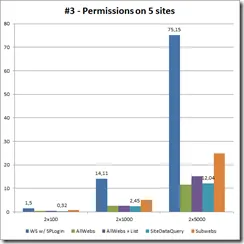
Comments:
For the exact same reasons explained in Scenario 1bis, the Web Services approach performs poorly and you can expect great performance improvements in such scenario.
Scenario 9
- The lists we are rolling-up are available in all sites.
- We are rolling up from a small branch (100 sites) inside a large site collection (10 000 sites).
- The user has the necessary permissions on all sites and lists in case 1 and on 5 sites in case 2.
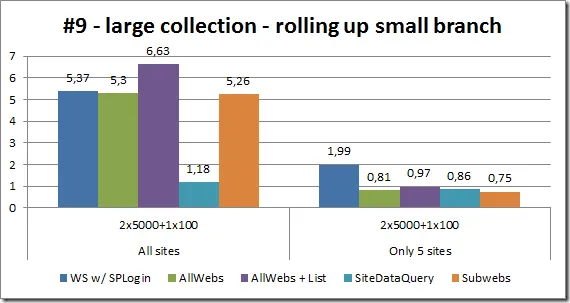
Comments
The idea of this scenario is to evaluate the impact of having a large site collection when rolling-up items from a small set of sites inside a branch of the site collection.
When items are retrieved from all 100 lists, “SiteDataQuery” shines.
When items are retrieved from 5 lists because of the limited user permissions, “SiteDataQuery” approach is outperformed (though marginally) by some other approaches that use specific optimizations.
Conclusion
If you have many queries that roll-up list items inside a site collection and if your Reporting Services installation is configured in SharePoint Integration mode, you will certainly love Enesys RS Data Extension 3.5.
Keep in mind that those benchmarks are focused on rolling up small lists within medium to large sites collections. This is an area which needed some particular attention.
We will provide an update with additional information describing the benefits that can be expected with smaller site collections and larger lists.